
David has posted a new story to Medium on "10 Axioms for the Metaverse". You can read it at https://medium.com/@davidjhburden/10-axioms-for-the-metaverse-26ac45c0e162
David has posted a new story to Medium on "10 Axioms for the Metaverse". You can read it at https://medium.com/@davidjhburden/10-axioms-for-the-metaverse-26ac45c0e162

Last year David and Prof. Maggi Savin-Baden and Dr Victoria Mason-Robbie (both of the University of Worcester and regular Daden collaborators) produced a 56pp eBook for the Defence Science and Technology Laboratory (DSTL) of the UK's Ministry of Defence on the pedagogy of virtual reality. Whilst that version was approved for public release earlier this year we thought it might be nice to have a copy with non-military imagery and which removed the (few) military specific references. This new civilian version of "Pedagogy for Virtual Reality Training and Education" has now also been approved by MOD for public release and you can download a free copy of it right now!
If you've got any comments we'd love to hear them - just email info@daden.co.uk, and if we can help you think through VR and Metaverse issues more generally then again just drop us a line.

A nice paper that we co-authored with Heidi Singleton form Bournemouth University on her Diabetes project in VR has finally seen light of day. You can read it on open access at:
https://www.nursingsimulation.org/action/showPdf?pii=S1876-1399%2822%2900016-0
The abstract is:
Background: A virtual reality simulation was used to teach treatment of diabetic patients.
Methods: This study evaluated the impact of using virtual reality on short term knowledge of hypoglycaemia, via pairing of a randomised controlled trial, analysed via Partial Least Squares-Structural
Equation Modelling. The setting was two large lecture theatres based at campuses within the UK. Second year nursing students (n = 171) volunteered to take part in the study. Students were randomised into two groups, control (n = 88) and experimental (n = 83). The trial enabled comparison, via preand posttest surveys, of the simulation with normative teaching methods.
Results: VR was found to be significantly (p ≤ .001) better in terms of hypoglycaemia knowledge than normative methods. The method also enabled identification of the key point of action of the simulation, which evidenced that the “engagement to immersion” pathway was responsible for leading to higher knowledge scores in the experimental group.
Conclusion: This paper claims addition to knowledge about how the novel approach taken has the potential to deepen understanding of how virtual technologies can affect learning in nurse education.
https://doi.org/10.1016/j.ecns.2022.02.009.

David Wortley, once the Director of the Serious Games Institute, has done a nice write-up of my early experiments on Data Visualisation in Second Life. You can read it here:
Interesting piece in Immersive Web Weekly on the "rift" between the Oculus/Chrome implementation of WebXR and the Firefox/HTC/others version.
Today XR headset makers face a tough choice among immersive browsers: invest a considerable number of people to maintain a custom Google Chromium-based browser with great WebXR support (as Facebook does for the Quest) or port a Mozilla Gecko-based browser like Firefox Reality and deal with XR support that hasn't changed in any substantial way since Mozilla's Mixed Reality team was laid off more than a year ago.
Last week Shen Ye followed the path of the Pico team in revealing that HTC's new Vive Flow headset will ship with Firefox Reality and Stan Larroque also announced in a YouTube livestream that the Lynx team is working on a Firefox Reality port for their headset.
HTC, Lynx, Pico and Mozilla do not intend, as far as I can tell, to update Gecko's WebXR implementation. The divergence between Chromium- and Gecko-based browsers has already fragmented the fetal immersive web, forcing developers to choose between supporting only one browser engine or writing what is effectively two separate rending and input handling paths for their code. If we want a healthy and open immersive web then this must change.
(editor's note for transparency: I was the original product manager for Firefox Reality but left Mozilla before the layoffs. I have donated to the Mozilla Foundation for more than a decade and continue to do so but have no equity or other financial ties.)
We've bumped into this at Daden when looking at using Pico for a potential project. Pretty typical of the industry, agree a new standard and then immediately split it in two!

Been experimenting a bit with 360 photos in Mozilla Hubs. They are just part of an empty room, so you can add 3D objects "inside" the photo, although without any scripting you can't create hot-spots as such. You could though add links from one to another - but on its own that's not a smooth transition.
What does work well though is the ability for the room owner to load scenes around the participants, so you can do an immersive slideshow, everyone starting in one place, and then load a 360 around them, and then another one and so on. If you added a map or 3D table model like the one below you could end up doing quite a nice human-guided field trip/battlefield tour/holiday slideshow.

The photosphere shots here are ones I took on my iPhone at the base of Uluru, and apart from a few glitches at the joins they come out pretty well in Hubs.
Of course the nice thing about using Hubs for something like this is that its very social and involving - everyone sees the same image at the same time, can see and talk to others, and naturally tends to move around the space towards the bits of the photo they are interested in so larger groups naturally fragment to smaller groups if desired - which with spatial audio enables lots of parallel conversations to go on.

And here's more of a heritage/built environment shot from Hougoumont Farm on battlefield of Waterloo.

Just get in touch if you've got a good idea of how you might be able to use this approach to 360Vr in your teaching/training/education/out-reach.

This 3D environment lets you find out about Daden and what we do, play with some of the Mozilla Hubs tools, and follow teleports to some of our other builds in Mozilla Hubs.
We are increasingly using it instead of Zoom for some of our internal meetings, and don't be surprised if we invite you into it for external meetings too!
You can visit Daden Hub now in 2D or VR at https://hubs.mozilla.com/SJy5Hwn/daden-hub.
Here's a short video giving you a tour of the Hub.
Give us a shout if you'd like to meet up in the space and get a more personal demo!

I went to the Oculus Quest2 launch event in an earlier Beta, and it was OK but very basic, just move your avatar to a row of cinema seats and sit there. So what has changed?
You start with an avatar design session in your own room (not much choice of anything, but just enough to minimise identikit avatars), and then some very basic movement and interaction instruction. There is a very nice menu UI on your inside wrist which opens up to give you access to the main tools. You can navigate either by a local teleport method (move a circle to where you want to go) or free physical/joystick-based movement.
When you leave the room and new space loads and you enter the Venues atrium.

There's space for I think about 8 "suites", 4 down each side. I don't know how shared this is. My venue had the poster outside and declared 38 attendees.

Entering the suite another space loads. I say "suite" as there is a ground level space and a balcony space, both looking out to a big 2D screen where the Zoom relay was - 3 talking head webcams.
Now as an event experience it was pretty poor. The difference between the 3D/avatar us a 2D/video them is big. I know you might pick up less nuances if they were avatars but at least it would feel more like a seminar than a cinema. And if you were on Zoom you could ask questions by chat, but there was no chat facility in VR (and without a Bluetooth keyboard typing questions would be a pain). Also the lack of chat meant that there was no side channel between the attending avatars - amplifying points, sharing links, getting to know each other. If someone tried to talk to you it just got in the way of the presentation - just as in the physical world. I know I keep saying it but c.2010 Second Life events felt far better.
 |
| Unfortunately the Venues screenshot camera doesn't show the video content! |
The other big issue were my co-attendees. I know I'm the only person on the ground level who was there from beginning to end. Maybe a handful of others were there for 20mins plus. I'd say peak occupancy was a dozen, more often half that. Most of the people though were there to play and have fun, several were kids (mics on whole time, talking over the presenters etc), and were just having a laugh. Imaging trying to attend a seminar whilst a group of tweens charges through. Luckily at least one group decided to "take the party upstairs" and when I checked in at the end the balcony certainly seemed busier - but that was after the talk finished.
So not convinced.
On my way out I decided to check out the other suites. Only one was in use with 24hr Wrestling. Same layout. But a couple of big differences.
First, the video was 360 style, in fact I think it was even stereoscopic, so it really did feel like you were ringside watching the fight. It filled the whole of the space in front of you, and had a real sense of depth.
Second, as there was no commentary as such, it was just the fight, all the avatars chatting, shouting and fooling around with the cameras and confetti was all appropriate for the event - everyone was ringside!
 |
| The Wrestling crowd - not that you can tell with no video! |
So I hadn't expected that a Wrestling event would beat an SF/Tech/Games event as a good demo of using VR for events - but it did. Just goes you need to think about the complete experience when looking at how to use VR (and immersive 3D) for different kinds of events.

iLRN Attendees: The link to the session is: https://hubs.mozilla.com/PNaoEvs/daden-virtual-experience-design-space - this will launch you straight into Mozilla Hubs. If you're in VR the hub.link code is 563553.
If you haven't been in Mozilla Hubs before we also have a tutorial space at: https://hubs.mozilla.com/fFVfvrq/onboarding-tutorial
On the basis of practice-what-you-preach we've created a prototype Virtual Experience Design Space (VEDS) in Mozilla Hubs and opened it up to public use. The space takes a number of design tools that we've used for many years, and which we already have within our Daden Campus space in Trainingscapes but makes them available to anyone with a browser (including mobile) and any WebXR capable VR headset (such as Oculus Quest). Of course the nice thing about WebXR (and so Hubs) is that everything runs in the browser so there is no software to download - even on the VR headset.
Here's a video walkthrough of the VR experience.
Within the space we have four different 3D immersive experience design tools:


The last couple of years have seen a dramatic increase in the number of social virtual worlds around. We define such platforms as internet based 3D environments which are open to general use, are multi-user (so you can see and talk to other people) and within which users are able to create their own spaces. The worlds are typically accessible by both a flat screen (PC/Mac, and sometimes mobile/tablet) and through a VR headset.
At Daden we’ve been using these sorts of environments since the early 2000s. What is really beginning to change the game now is the emergence of WebXR social virtual worlds. These are completely web-delivered, so you only need your browser to access them (from PC, mobile and even VR headset), so there is no download, minimal differences between platforms and really easy access. They are emerging as a great way to get people off of Zoom and into somewhere more engaging for whatever social or collaborative task you need to do. The key examples at the moment are probably Mozilla Hubs and Framevr.io.
Below we highlight some of the key affordances, benefits and uses of these WebXR Social Virtual Worlds.

As part of my DadenU day I thought I'd try out another SocialVR environment - this time Spatial (not to be confused with vSpatial which is a VR "virtual desktop" app). Spatial is downloaded as an app onto the Quest. The web client only works in "spectator" mode rather than giving you a full avatar presence.
A really nice touch is that your available "rooms" show as little mini-3D models to choose from (see above). However this doesn't look to be scalable as they are a fixed selection of shapres and actually only emphasises the pre-canned nature of the environment.
Another "USP" is that it takes a webcam image to generate your avatar. OK I didn't try to optimise it and was probably look up too much but the result was very uncanny valley... And you can see from the arm position why many apps have gone for only head-body-hands, missing the arms.

There are a number of fixed office/meeting room type environments to use, but no option I can see at the moment to make your own. There is a big display board, but it wasn't really clear how that worked. "Spectators" appeared in world as their webcam feed above the board. You could separately rez post-its, a shared web browser, images from your desktop etc. There's also a library of 3D models which I guess you can add to - but not too obvious how.
Navigation seemed very clunky with step wise rotation on the joystick - hard to manoeuvre in a space which albeit small is still larger than my room to freely wander in VR in.

And that's sort of it.
As a step towards a very business orientated VR space it's not bad, if they can improve the typical avatar capture to the quality that seems to be in the promotional shots that would be great, and a scalable version of the room models would be wonderful to see more widely. But why be a slave to the real-life model - their "Mars" planning room has a small model of a crater, and a small model of Curiosity - why not have both full scale (and the crater small scale) and have the meeting on Mars?
Here's my initial take on Spatial plotted on our radar diagram, and below some key thoughts on each measure.


As part of our work on a forthcoming white paper looking at the ever-growing range of 3D immersive environment platforms available we thought it would be useful to identify some criteria/function sets to help make comparison easier. If you were to use these as part of a selection exercise then you'd probably want to weight them appropriately as different use-cases would need different features. We've also assumed that all offer a common feature set, including multi-user and text/voice communications, walk/run, screengrabs etc.
A lot of these categories are quite encompassing, and a further analysis may split them down into sub-categories - or create more higher level categories where a particular feature becomes important. We may well revise this list as we work through the platforms (at least 25 at the current count) but here's our starter for 10 (in alphabetical order).
 |
| Radar Plot - Mozilla Hubs |
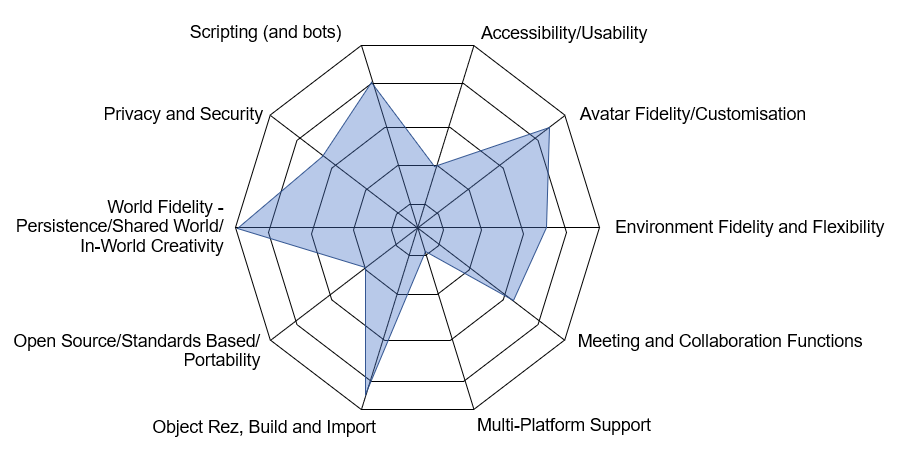 |
| Radar Plot - Second Life |

Whilst this application was originally built as a side project it shows some principles and ideas which are probably worth sharing here. The application uses WebXR to display data in VR. The data is fetched from a web service, and the user can choose what data parameters are used on two of the point features, in this case size and height. The key thing about WebXR is that it lets this visualisation run in a VR headset without any download or installs. Just point the in-built browser at the URL, click on Enter VR and the browser fades away and you are left in a 3D space with the data.
The data itself is the star map used in the classic GDW Traveller game (think D&D in space) - but as we say the data isn't important, just the novel interaction.
To try out our Data Visualisation in WebXR just use the browser in your WebXR compatible VR headset to get to this page, and then click on the link below. Once the new page loads just click on the Enter VR button.
Note that whilst the page will open in an ordinary browser you won't be able to do much. But watch the video here to get an idea:
You can also read more about 3D Immersive Visual Analytics and the differences between allocentric and egocentric visualisation in our white paper.

So it was fun to spend some time in there this week and see what's going on. The initial driver was an ImmerseUK informal meetup, held on the Burning Man site - some nice builds and all very reminiscent of SL circa 2008.


The avatars are less blocky than the originals, but still deliberately cartoony, but better proportioned than the VirBela ones. Things I liked (this was all via Oculus Quest):
 |
| The main edit panel |


Christian Schott and Stephen Marshall of the Victoria University of Wellington have quite a nice paper out in the Australasian Journal of Educational Technology, 2021, 37(1) and on open access at https://ajet.org.au/index.php/AJET/article/view/5166/1681.
Coming from an Experiential Education (EE) perspective they draw on a UX model by Hassenzahl and Tractinsky (2006) which consists "of three facets guided by a positive focus on creating outstanding emotional experiences, rather than on adopting a mostly instrumental, task-oriented view of interactive products, which is a core criticism of traditional HCI."
The research used a VR experience of a Fijian island being developed to help better understand tourism economics on a Pacific Island, and the experimental subjects were Tourism Management students.
The UX evaluation identified 8 clusters of responses which map onto the three evaluation dimensions as shown above are were:
Pity that Agency wasn't on there, and it would be interesting to see how a 2D/3D evaluation of the same experience would change the ratings and clusters give.
The authors conclude that "The evolution of VR technology is increasingly enabling high fidelity and motivating EE learning activities to be offered at a relatively low cost, particularly when the logistical, resourcing, and ethical issues of alternative approaches are considered. The nuanced analysis of the identified positive and negative themes, through the lens of Hassenzahl and Tractinsky’s (2006) adapted three UX facets, has provided valuable albeit indicative guidance where to concentrate refinement efforts. However, it is also evident that a great deal of further research on the user experience is required to extend our understanding of full-immersion VR technology as an important opportunity for EE and higher education more broadly."
Nice paper, well worth a read, and the UX model and dimensions could be a useful one to bear in mind when looking at evaluating other 3D/VR experiences.
Hassenzahl, M., & Tractinsky, N. (2006). User experience - a research agenda. Behaviour & Information Technology, 25(2), 91-97. https://doi.org/10.1080/01449290500330331
The COVID epidemic is bringing a whole host of challenges to tutors and trainers in trying to deliver engaging teaching to students and staff – and in particular learning experiences which give the student a sense of context, place and shared experience.
With on-site and classroom learning facing the greatest problems, many are naturally turning to remote teaching by Zoom (and similar), eLearning systems, or video. The diagram below briefly highlights key challenges with each of these - and we'll dive into more detail next week.

Whilst the uptake of headset-based virtual reality (HMD-VR) for both entertainment and training/education has been increasing in the last year or so (and Oculus sold out of the Quest headset early in the pandemic, and its new Quest2 had 5 times the pre-orders of the Quest1), the HMD-VR approach has its own challenges during COVID:
• Sharing headsets within a central location needs rigorous cleaning between use
• Posting/couriering headsets around remote students is costly and risky
• The cost of equipping every student with their own VR HMD is too expensive for most organisations/institutions.
And this is quiet apart from the challenges of the space to use them (although we’ve found the garden is good – at least in summer!) and the discomfort that some users feel.
So given the current situation shouldn't tutors and trainers be re-considering the 2D/3D approach to immersive learning – the Sims/Computer Game style where you operate in a 3D environment but the experience is delivered on an ordinary 2D screen – be that on a PC/Mac, tablet or even smartphone.

Such systems have the advantages that:
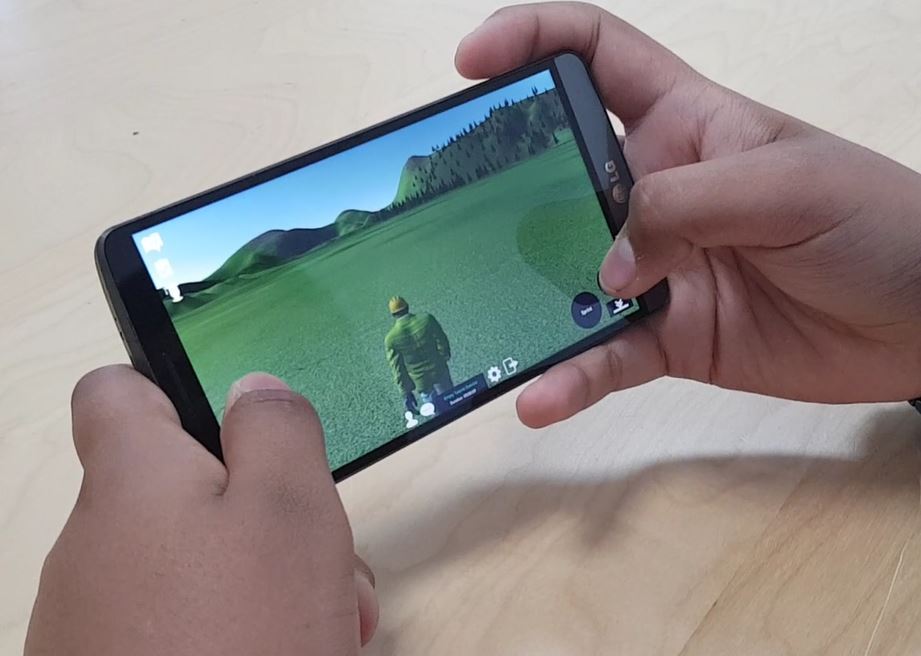
And of course with Trainingscapes you can generate content for 2D/3D and VR at the same time, so if the situation changes and VR becomes more do'able (for some students, some of the time) then you'll be ready.

In the graphic above we've tried to show the difference between the systems in terms of the access device and what they are trying to do to reality.
In one dimension we have whether the system is trying to completely replace what the user is seeing/experience - they only see the digital world, or whether it is augmenting it - adding new content into what the user otherwise sees as the physical world.
In the other dimension we have whether the system is accessed through a flat screen or a headset. The flat screen might be an ordinary PC screen, or a tablet or smartphone, whilst the headset might be a VR one or an MR one. A key point is that for the AR/MR solutions the access devices has some way of also showing the physical world which is being manipulated - via the phone camera for AR, or a transparent visor for MR.
These two dimensions then give us our four main use cases:
Let us know if you've any comments on this segmentation, and/or if you find it of use.

As a company that been creating immersive experiences for over 15 years we find that the contemporary obsession with headset based virtual reality (HMD-VR) is often at risk of a) forgetting what valuable work has been done in the past in non-HMD immersive 3D environments and b) not highlighting to potential clients that a lot of the benefits of "VR" can be obtained without an HMD, and not having the funds for, or access to (esp in COVID) HMDs does not need to stop a VR project in its tracks.

One problem is that we just don't have the right terminology, and what terminology we have is constantly changing.
"VR" has almost always been assumed to mean HMD-based experiences - using headsets like the Quest, Rift or Vive - or even their forerunners like the old Virtuality systems.

But in that fallow period between Virtuality and Oculus DK1 3D virtual worlds such as Second Life, There.com and ActiveWorlds were enjoying a boom-time, and often found themselves labelled as "virtual reality".

One problem is that there seems to be no commonly accepted terms for the classic Second Life (or even Fortnite) experience, where you can freely roam a 3D environment but you have a 3rd (or sometime 1st) person avatar view of it. It's certainly not 2D. It's sort of 3D - but not as 3D as the stereoscopic experience using a VR-HMD. I've seen 2D/3D or "3D in 2D" but both are cumbersome. We sometimes refer to it as "first-person-shooter" style (but that doesn't go down well with some audiences), or "The Sims-like".
There's also a qualitative difference between say a 3D CAD package where you're rotating a 3D model on screen (called an allocentric view) and the experience of running through Fortnite, Grand Theft Auto, or Second Life (called an egocentric view). You feel "immersed" in the latter group, not just because of the egocentric view point but also because of the sense of agency and emotional engagement.
At a recent Engage event I went to I'd guess (from avatar hand positions) that about 50% of attendees were in VR-HMD and 50% using the immersive-3D desktop client. So should it be described as a VR or immersive 3D system? Our Trainingscapes is the same, we can have users on mobile, PC and VR-HMD devices all in-world, all interacting. And Second Life is often "dismissed" as not being "proper VR" - but when Oculus DK1 was around I went into SL in VR - see below - so did it stop being VR when they went from DK1 to DK2?

So if a system can support both - is it a 2D/3D system or a VR system? That is why we tend to refer to both the 2D/3D approach and the VR-HMD approach as being "immersive 3D" - as long as you have a sense of agency and presence and the egocentric view. It's the experience and not the technology that counts.
And don't get me started on what "real" and "virtual" mean!
No wonder clients get confused if even we can't sort out what the right terms are, and its far too late for some de jure pronouncement. But perhaps we all could try and be a little bit more precise about what terms we do use, and whether they are just referring to the means by which you access an experience (e.g. VR-HMD) or to the underlying experience itself (such as a virtual world or virtual training exercise).
In later posts I'll try and look more closely at the relative affordances of the 2D/3D approach (better name please!) vs the VR approach, what researchers experiences of virtual worlds can teach us about VR, and also how "virtual worlds" sit against other immersive 3D experiences.


