Showing posts with label vlearning. Show all posts

10 February 2021

Introducing VEDS - A Mozilla Hubs based Virtual Experience Design Space


iLRN Attendees: The link to the session is: https://hubs.mozilla.com/PNaoEvs/daden-virtual-experience-design-space - this will launch you straight into Mozilla Hubs. If you're in VR the hub.link code is 563553.

If you haven't been in Mozilla Hubs before we also have a tutorial space at: https://hubs.mozilla.com/fFVfvrq/onboarding-tutorial


On the basis of practice-what-you-preach we've created a prototype Virtual Experience Design Space (VEDS) in Mozilla Hubs and opened it up to public use. The space takes a number of design tools that we've used for many years, and which we already have within our Daden Campus space in Trainingscapes but makes them available to anyone with a browser (including mobile) and any WebXR capable VR headset (such as Oculus Quest). Of course the nice thing about WebXR (and so Hubs) is that everything runs in the browser so there is no software to download - even on the VR headset.

Here's a video walkthrough of the VR experience.


Within the space we have four different 3D immersive experience design tools:

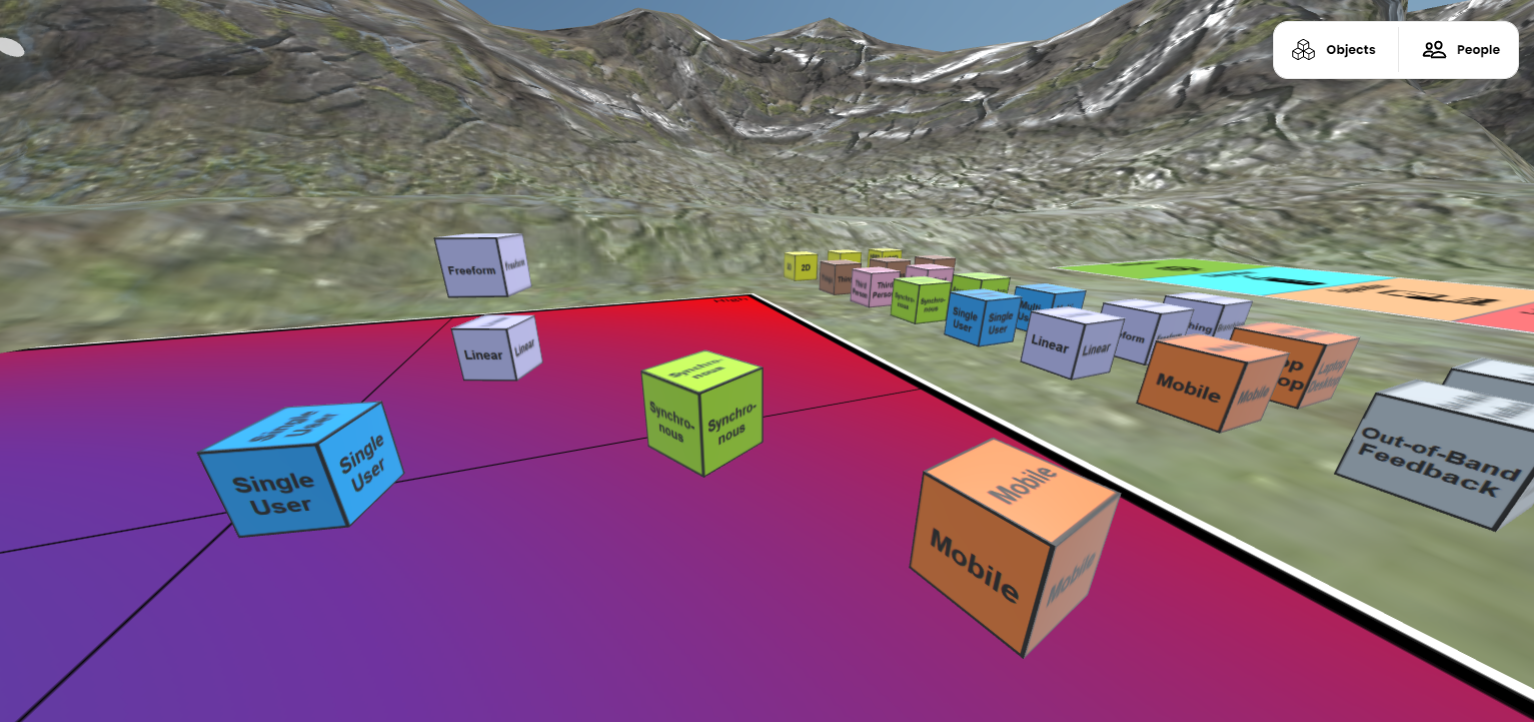
  • A dichotomies space, where you can  rank different features (such as linear/freeform or synchronous/asynchronous) against a variety of of different design factors (such as cost, importance, time, risk).
  • Sara de Freitas's 4D framework for vLearning design
  • Bob Stone's 3 Fidelities model
  • Bybee's 5E eLearning design model 
Each is represented by a suitable floor graphic and then how you use them is up to you. There are labelled boxes for the dichotomies space - but you can use them anywhere. There are also a set of markers, so you can get people to "vote" by placing markers (or even their avatar) where they think the most importance/biggest issue/biggest risk is. It's all about using VEDS as a social, collaborative space to do immersive 3D and VR design.

We've linked out in the world to our white paper on the subject for more background on the tools, and you can even browse this in-world (at least from a 2D device, can't get it to work in VR yet!).

Of course Hubs has its own set of generic collaboration tools to use in-world and you're free to make use of those too, we've provided a media frame and a couple of whiteboards to draw on, and you can rez any of their standard objects - why not mark choices with cheeseburgers!

Here's a couple more images of the space:


What to give it a try? Just point your 2D or VR browser to:


The hub.link code is 149638 for easier access from VR.

No sign up is necessary, but remember that if you use our room, rather than spawning your own, then you may well meet other users (including us) in there. We're setting the room to "Remix allowed" so you can also create your own version of it - do let us know if do!

If there's interest we might even see about holding some live events in there to talk about the tools in more detail.

We'd love to hear what you think of VEDS - just drop us a line in the comments, or email us at info@daden.co.uk if your organisation could do with a similar space structured around the tools you use.


21 December 2020

Daden Video Presentation(s) at the GIANT Health Conference


David presented at the GIANT Health Conference on 2nd Dec, giving an overview of our increasing number of health related immersive 3D/VR projects. You can watch TWO versions of  the 20 min presentation and Q&A session by clicking on the images above due to some confusion in GIANT arrangements, the second has an interesting chat about future VR ecosystems at the end of the Q&A.


(Both videos should start about 10-15 secs before David's piece)


9 December 2020

New JISC Report - Learning and Teaching Reimagined (not?)


JISC - the body which advises FE/HE on the use of technology has issued an important new report on Learning and Teaching Reimagined. 

"The flagship learning and teaching reimagined report is the result of a five-month higher education initiative to understand the response to COVID-19 and explore the future of digital learning and teaching. Learning and teaching reimagined, with the support of its advisory board, and more than 1,000 HE participants, provides university leaders with inspiration on what the future might hold, guidance on how to get there and practical tools to develop your plans."

As a member of JISC's Virtual Reality Framework we were fascinated to see what the report has to say about immersive learning technologies.

The report identifies 4 possible future scenarios - more to drive discussion than as future options:
  • A very familiar learning experience on campus, for students who have already adapted to a socially-distanced world. Important and distinctive here is institutional resilience is the sole driver for use of technology-enhanced learning and teaching, the ability to adapt to significant change and move operations fully online as and when required. Learning and teaching is predominantly face to face and, as such, is far less reliant on technology-enhanced learning.
  • Technology-enhanced learning supplements a ‘traditional’, lecture-led, synchronous learning and teaching experience. It feels familiar to students, while offering a broader range of learning opportunities. Significantly it offers confidence in the resilience of the university experience. Leaders are increasingly aware of the benefits of technology-enhanced learning and recognise the efficiencies gained from supplementing their preferred campus-based models.
  • A ‘step change’ in the higher education offering. Students experience flexibility and convenience of learning, increasing enabling adaptive and self-directed learning, with more active learning opportunities. Leaders are increasingly fluent in technology-enhanced learning and appreciative of the opportunities to adapt their offering to reach wider range of markets. Investment has begun to improve the quality and coherence of the learning and teaching experience, increasingly appealing for a diverse student population with a more inclusive and accessible experience.
  • Students embrace the fully-online experience, seeking greater flexibility and an increasingly personalised learning experience. With most higher education providers adapting and enhancing their technology-enhanced learning and teaching experience in some way, the imperative for leaders and staff in this scenario is to demonstrate the high quality, unique nature of their fully online offering.  
Their "primers" for senior leaders on topics such as digital learning and innovation mention no technologies specifically, but their case studies seem more to be about good 2D VLE implementations and blended learning (thought that was a given) than more innovative approaches, such as immersive 3D, despite such technology being used in HE learning for almost 15 years now! The report has one case study which includes VR - and that is 360degree video in surgical training.

"Mixed Reality" fares slightly better with 3 mentions (two the same). There is also mention of "Virtual Worlds" (twice, duplicates), but not definition of what they mean - so could just infer VLEs. The phrases "In 2030 UK higher education learning and teaching is regarded as world class because it is
attractive to all students, seamlessly spans the physical and virtual worlds and is of the highest
academic quality" and "Students move fluidly across physical, digital and social experiences. The integration of mixed reality technologies strengthens the strong sense of university identity and community, no matter how students choose to participate and learn." are nicely aspirational but could mean anything and the report gives no hint as to how they might be achieved - or even really paints a picture of what they might mean. The closest is "We also do field trips, using virtual reality and 3-D
walkthroughs, to places I’d never be able to go otherwise" - which seems a bit 2020 (at least for some) not 2030.

Interestingly the report does have a bit more to say/paint around the idea of students having an "AI" learning guide/coach to help them with their learning, guide them to things they need to know, and possibly support them with alternate routes/methods when they struggle - time to dust off our Virtual Tutor work!

Potentially confusingly the report also links to QAAs Building a Taxonomy for Digital Learning which described immersive digital learning as an "Immersive digital engagement/experience where digital learning and teaching activities are designed by a provider as the only way in which students will engage, both with the programme and with each other. Students will be required to engage with all the digital activities and will not be offered the opportunity to engage with learning and teaching activities onsite at the provider." - so more like language learning by immersion than the use of any immersive technology. The same document has a glossary listing for AR, but none at all for VR!

So all in all it does seem a bit of a business as usual report. Whilst the scenarios are interesting there is very little in there that might encourage educational leaders to look at the potential of immersive 3D/VR - and indeed hardly anything to suggest to them that it might exist. Make better use of your VLE seems the bottom line to me!

I'd originally put a pic of a learner using a VR headset at the top of this post, but the new image seems more appropriate somehow!

If you want to be excited by what  Learning and Teaching Reimagined might be. perhaps you'd be better offer reading Chapter 4 of Ready Player One?

“During our world history lesson that morning, Mr. Avenovich loaded up a standalone simulation so that our class could witness the discovery of King Tut's tomb by archaeologists in Egypt in AD 1922. The day before, we visited the same spot in 1334 BC and had seen Tutankhamen's empire in all its glory. In my next class, biology, we traveled through a human heart and watched it pumping from the inside just like in that old movie Fantastic Voyage. In art class, we toured the Louvre while all of our avatars wore silly berets. In my astronomy class, we visited each of Jupiter's moons. We stood on the volcanic surface of Io while our teacher explained how the moon has originally formed. As our teacher spoke to us, Jupiter loomed behind her, filling half the sky. It's Great Red Spot, turning slowly just over her left shoulder.”

You can download a copy of the report from https://www.jisc.ac.uk/learning-and-teaching-reimagined

Of course it's pretty easy to criticise, so let's be a bit more constructive. What would my vision of a 2030s learning, and specifically immersive 3D learning, look like:
  • Based on open-source technologies, probably WebGL/OpenXR and their descendants
  • Web-delivered, no downloads
  • Every experience available on desktop/laptop, smartphone/tablet or VR headset, albeit tweaked for each platform, and primarily a student choice as to which to use
  • A consistent identity system (like OpenID/OpenAvatar) across experiences, so you don't need a different account for each one
  • Consistent interfacing to VLEs/LMSs, e.g. via xAPI to manage student access and analytics
  • A way for teachers, tutors, and students to author their own content, and with the training to do so and the supporting pedagogy to design it well
  • Each school/tutor/student/subject can have its own "home space" where creativity and social interaction is encouraged
  • Exercises authored/encoded in a semantic way so accessible versions can be easily generated (e.g. a sound world for a student with visual impairment), and to more readily generate lesson variations (eg for learning and assessment) for the same location/props
  • A way of publishing experiences/exercises/assets to others, with IP control, eventually providing asset and exercises sets that cover the entire curriculum, and tutor/student developed
  • Some flagship centralised resources, such as a complete virtual hospital
  • A way of linking content together - portals from one experience to another, so the entire system can run on a federated system of servers
  • The ability to have experiences as single or multi-user, to cope with asynchronous and synchronous learning and differing student needs
2030 is only 9 years away, but most of this is do'able now if we set our minds to it.

Perhaps it's time to write another White Paper?


1 December 2020

Video, eLearning and VR - and the 3 Fidelities

One design model I've always liked is Prof Bob Stone's "3 fidelities" for designing immersive 3D/VR experiences.  The three fidelities are:

  • Context/Environment Fidelity - how well do the surroundings model the real environment and context - but more is not necessarily better;
  • Task Fidelity - how well to the sequence of actions (and their consequences) model the real task;
  • Interaction Fidelity - how well do the manipulation and haptics mirror those experienced in real life.


My favourite example of Interaction Fidelity was talking to medics who gave students bananas to practice their incisions and suturing on - the bananas bruise and tear so easily it's easy to spot mistakes. Absolutely no context fidelity, and a part trainer so no real task fidelity needed, but a far better experience than trying to reproduce the activity in even the latest VR gear!

So I was wondering recently how do some of the current methods of distanced learning match on to the these fidelities. We know that it should be a case of blended learning - not one method to rule them all - but where do each of the current approaches have strengths or weaknesses?

The table below summaries our initial take as to how video, video-conferencing, eLearning and immersive 3D/VR map onto each of these fidelities.

Click image for a larger version

Note just how low eLearning scores against all of these - it may be OK for more "knowledge" based learning, but for learning that relates to places, physical tasks or interactions it really isn't a good fit.

Video can be very good for giving the sense of environment, but you can't explore beyond the frame. And whilst there is some great interactive branching video out there that explores the task dimension it is very costly to produce, and next to impossible to change.

Zoom style video conferencing can leverage some of the advantages of ordinary video - such as video tours or how-to, but again the leaner tends to be a fairly passive participant in these. Where it would score more strongly is the in the discussion/analysis phase of cementing learning.

Immersive 3D/VR can give a range of environmental fidelities, and is very good at modelling task fidelities and giving the user the options and agency to explore different routes. But like the others it fails on the interaction fidelity although we are beginning to see improvements in that area - whether it's thru haptics or features such as facial expression and body language - both of which contribute to the interaction.

So we hope that this has given you a different lens with which to look at different types of remote learning technology, and that it will help you choose the appropriate technologies for the learning task at hand.


25 November 2020

Case Study - In-Patient Diabetes Management

​With Bournemouth University we've been developing a training exercise for students to practice their response to a diabetes situation with an in-patient on the ward. 

Students could access the exercise with their from a normal PC, tablet or smartphone, or using a Google Cardboard VR headset.


The exercises was used for an A-B comparison with traditional eLearning and students on the 3D/VR exercise which found that the latter group performed "significantly better". 

Several research papers are coming, but our favourite student response was "“I really enjoyed it. Can we have more scenarios please?”!

You can read a bit more about the project and findings in our short case-study.


13 November 2020

PIVOTE on Israeli TV


A lovely bit of video has just emerged that show long time friend and VR/VW colleague Dr Hanan Gazit demonstrating our old PIVOTE system (the forerunner of Trainingscapes) on Israeli TV about a decade ago! The system ran in Second Life and Open Sim, but crucially the exercise server was on the web, and training content could be edited on the web, not in Second Life. Exercises were defined by an XML file, and that heritage and approach is still in Trainingscapes - keep the exercise definition and player logic independent of the actual 3D (or 2D or audio) environment you use to experience it in. It's a logic that should let us develop a nice WebXR player for Trainingscapes relatively easily.

You can watch the video here (in Hebrew - although it's got sign language!):


5 October 2020

World Space Week - WebXR Solar System playground


Normally at this time of the year we'd be down at The Hive in Worcester for the BIS World Space Day event - the largest of its kind in the UK. Of course with COVID19 that's not happening, so here instead is a little "work in progress" of a solar system playground in WebXR. You can't view this on the web, but if you have a VR headset that is WebXR compatible (most of them now) you can use the headsets web browser to go to:

  • https://www.daden.co.uk/webxr

Then follow the Solar System Playground link from that page to the WebXR page, click on the Enter VR button, and immerse yourself in the Solar System.

This is a quick tour of what you should see and what you can do:


The main features are:

  • Set sizes of planets to linear or log scale
  • Set orbit sizes to linear or log scale
  • Just grab hold of a planet to bring it up close to look at it, and turn it over in your "hands"
  • Display labels on planets and/or audio naming as you click on them
  • Randomise planet positions, sort them into order, and then have your solution scored
  • Hide the floor (not for those with vertigo!)
  • Move with joystick or by clicking on the footsteps
  • Set sizes and orbit sizes to "real" values, scaled to the sun. This make things VERY small and VERY spread out. There's a guideline to help you find all the planets, and Pluto (and maybe Neptune) might actually be outside of the "star" bubble - feels very otherworldly that far out!

Note that this is still a work-in-progress and may have a few bugs, but with World Space Week happening and lots of us in some sort of lockdown we thought it a good time to get it out!

Any bug reports or comments for improvements in the comment or by email to wsw@daden.co.uk.

Enjoy, and hopefully we can meet physically for World Space Week next year!


13 July 2020

Further Adventures in WebXR - Playing with the Solar System


Having a bit more of a play with WebGL/WebXR and now have a nice draggable solar system! Could be a neat learning tool once finished to get the planets in the right order, too  look at their globes in more detail, and perhaps access further information about them. With World Space Day/Week going virtual might be time to set up a gallery of experiences for people to try that week. 

Need to sort a few more things first though - like rings for Saturn, a starscape backdrop, and change the highlight colours. Maybe also the option to check your order and give the you the right one. Also need to add a sun, and shrink the planets even further!


The more we play with WebGL/WebXR the more excited we are by it as a tactical solution, quickly creating small but powerful bespoke VR experiences that can be instantly accessed by anyone with a WebXR compatible VR headseat without any need for an install!


9 July 2020

Virtual Archaeology Review publishes Virtual Avebury Paper


The Virtual Archaeology Review has just published Professor Liz Falconer's paper on the Virtual Avebury project we did last year. The paper looks at the response to the VR experience by visitors to the National Trusts Avebury Visitor Centre - where two people at a time could collaboratively explore the Avebury site as was - i.e. without a village being built in the middle of it and all the missing stones replaced!

You can read the paper at: https://polipapers.upv.es/index.php/var/article/view/12924/12360


Key findings included:

  • More than 1200 members of the public experienced a 3D, fully immersive simulation of Avebury Henge, Wiltshire, UK over a nine-month period.
  • Patterns of use and familiarity with information technology (IT), and using mobile technologies for gaming were found that did not follow age and gender stereotypes.
  • There was little correlation between age, gender and IT familiarity with reactions to Virtual Avebury, suggesting that such simulations might have wide appeal for heritage site visitors.

Some of the key data are shown below:


Emotional Responses to Virtual Avebury


Experiences of Virtual Avebury


Responses to the Virtual Avebury Soundscape


Read the full paper at: https://polipapers.upv.es/index.php/var/article/view/12924/12360


1 June 2020

Choices in Immersive Learning Design


When designing a new immersive learning experience we find that there are a number of dichotomies or spectra  that it is helpful to talk through with a client in order to ensure that all parties have a good idea of what is driving the immersive learning design and what the experience might feel like. Often there is a lot taken for granted, a lot discounted or assumed, and its not until you start talking about all these options that some of the preconceptions on both sides emerge.

To help us talk these through with clients we've even realised them as cubes within our virtual campus so that we can go in remotely with clients and move the boxes around as we talk about them, and typically lay them out on a cost/effort vs importance floor map - the sheer act of doing that helps to create visual and spatial cues which help in recall and even help to show the thinking that is going on.

So here are what we think are some of the key dichotomies, and you can find a fuller list and discussion of the remaining items in our Immersive Learning White Paper.


- Simulation vs Serious Game

In recent years this has become the big one – to what extent do you want the immersive experience to be a “simulation” of reality (so high on accuracy), and to what extent do you want it to be game-like (and so highly motivating)? The situation gets even further confused when people start talking about “gamification”. Having been involved in games design since before the days of personal computers we know that this really all comes down to game mechanics. To us something becomes a “game” as soon as you start to introduce (or exclude) rules or features that do not exist in the real world. Those things you introduce are called game mechanics – and might range from a simple countdown timer or scoring system to highly artificial features such as power-ups and upgrades.


- Linear vs Freeform

When we first engage with tutors and learning designers who have been used to working on eLearning projects we find that they tend to come with a very linear mindset. The learning is a sequence of actions and tasks, and each screen only provides a few options as you don't want to crowd the screen or confuse the learner. Coming from a virtual worlds background we are far more used to open learning spaces with lots of possibilities – trying to get tutors and designers to “unlearn” can be hard. One of the best approaches we have found is to get them to think of a learning exercise in terms of drama, or even e-drama. In fact, it's not even scripted drama we're often after, it's improvised drama. It's telling the student: this is the scene, here are the props, the actors are going to do something and you need to respond.

- Single vs Multi User

A major design decision is whether an environment is designed to be used by a single user (so they only see themselves) or by multiple users (so everyone sees and can interact with everyone else). Obviously multi-user is essential if you are looking at team and collaborative learning, or you want staff (or actors) to role-play characters in the simulation “live”. But multi-user suggests an element of scheduling, and also requires the users to have a network connection, so doesn't give the individual learner the maximum flexibility (e.g. learning on the underground), or let them practice in private.


- Synchronous vs Asynchronous

This choice is only relevant in multi-user mode – should the environment be designed for asynchronous use – i.e. everyone uses it at their own time and pace, or for synchronous use – more like a physical world team learning session where the team (and the tutor/assessor) are all present at the same time.  In asynchronous mode we are really talking about lots of individual single-user experiences, people using the environment as and when. With synchronous mode we are talking about timetabling and co-ordination, but the benefit is that we get to practice those team tasks that it may just not be feasible to practice and rehearse in the physical world due to limitations of time or distance.


We hope that's made you think through our ideas for immersive in a new way, and don't forget to check out the white paper for more details, or contact us if you'd like to talk them through - or even play around with the box set in our virtual collaborative 3D space.


31 March 2017

vLearning: From Second Life to Fieldscapes

Presentation from my Virtual Worlds Best Practice in Education Conference 2017 talk describing how our experiences in Second Life have influenced the development of Fieldscapes.


And here are some images from the event. It's always good fun to use Second Life to talk about virtual worlds.