Showing posts with label mozilla hubs. Show all posts

22 March 2021

360 Photos in Mozilla Hubs


Been experimenting a bit with 360 photos in Mozilla Hubs. They are just part of an empty room, so you can add 3D objects "inside" the photo, although without any scripting you can't create hot-spots as such. You could though add links from one to another - but on its own that's not a smooth transition.

What does work well though is the ability for the room owner to load scenes around the participants, so you can do an immersive slideshow, everyone starting in one place, and then load a 360 around them, and then another one and so on. If you added a map or 3D table model like the one below you could end up doing quite a nice human-guided field trip/battlefield tour/holiday slideshow.


The photosphere shots here are ones I took on my iPhone at the base of Uluru, and apart from a few glitches at the joins they come out pretty well in Hubs.

Of course the nice thing about using Hubs for something like this is that its very social and involving - everyone sees the same image at the same time, can see and talk to others, and naturally tends to move around the space towards the bits of the photo they are interested in so larger groups naturally fragment to smaller groups if desired - which with spatial audio enables lots of parallel conversations to go on.


And here's more of a heritage/built environment shot from Hougoumont Farm on battlefield of Waterloo.


Just get in touch if you've got a good idea of how you might be able to use this approach to 360Vr in your teaching/training/education/out-reach.


25 February 2021

Introducing Daden Hub - Daden's new virtual home in Mozilla Hubs


We've just launched Daden Hub - Daden's virtual home in Mozilla Hubs. 

This 3D environment lets you find out about Daden and what we do, play with some of the Mozilla Hubs tools, and follow teleports to some of our other builds in Mozilla Hubs. 

We are increasingly using it instead of Zoom for some of our internal meetings, and don't be surprised if we invite you into it for external meetings too!

You can visit Daden Hub now in 2D or VR at https://hubs.mozilla.com/SJy5Hwn/daden-hub. 

Here's a short video giving you a tour of the Hub.


Give us a shout if you'd like to meet up in the space and get a more personal demo!


18 February 2021

NASA's Perseverance Rover in Mozilla Hubs


What better way to celebrate the (hopefully successful) landing of NASA's Perseverance rover on Mars than by looking at it in Mozilla Hubs!

NASA wonderful model library at https://nasa3d.arc.nasa.gov/ not only has a nice model of Perseverance but its also a) a reasonable size and b) in the .glb format preferred by WebXR apps likeHubs - this is great news if NASA is now standardising on this format. The model is about 4x the recommended Hub size, so mobiles may have issues, but it loads in 20s or so.

As this is a quick build we've just dropped the model into our existing "mars-like" terrain. We checked it for scale and it looks pretty much spot on. We've not added any interpretation boards - we may do that later. 

If you're in VR then you can have great fun getting on your hands and knees to look under the rover - although we couldn't spot Ingenuity.

The model is at: https://hubs.mozilla.com/o3c26nJ/perseverance-mars-rover with a room code of 817861 if you're using a headset.

Remember that since this is WebXR you can just click immediately on the link above to go to Mars in your browser, no need to download or register, and it works with or without a VR headset.

Have fun, and do let us know how you get on in the comments and/or post images on Social Media and share with friends.

And don't forget to also check out our SpaceX Starship Hub room to look at the next generation of Mars spacecraft. That's at https://hubs.mozilla.com/SMUKcDy/starship-test. 

Update: Here's a video of the rover from inside our VR headset:


12 February 2021

SpaceX Starship in MozillaHubs


MozillaHubs is designed to be a relatively low-poly environment so as to have speedy downloads and to work on mobile devices and standalone VR headsets.

Having been quiet pleased with the size of terrain mesh we could bring into MozillaHub we decided to try and use a more substantial 3D model - in this case of Elon Musk's SpaceX's Starship spacecraft. The model is by MartianDays on Sketchfab, and whilst not the highest rez (we were trying to avoid that!) it does look pretty good. For the record it's 20,600 triangles, which compares to 1.2 million (!) for a hi-rez model.

Again we're quite impressed at how well its come in. Load times are pretty variable from 30s to 1 minute, sometimes 2 minutes, but it displays very smoothly once you're in there. And with a VR headset on, looking all the way up to the top you get a real sense of the scale of the thing. We've lifted it off the ground so you can walk underneath to see the Raptor engine bells.

If you want to take a look - in a browser or in VR -  go  to:

https://hubs.mozilla.com/SMUKcDy/starship-test

The hub.link code is 416509 for easier access in VR.


10 February 2021

Introducing VEDS - A Mozilla Hubs based Virtual Experience Design Space


iLRN Attendees: The link to the session is: https://hubs.mozilla.com/PNaoEvs/daden-virtual-experience-design-space - this will launch you straight into Mozilla Hubs. If you're in VR the hub.link code is 563553.

If you haven't been in Mozilla Hubs before we also have a tutorial space at: https://hubs.mozilla.com/fFVfvrq/onboarding-tutorial


On the basis of practice-what-you-preach we've created a prototype Virtual Experience Design Space (VEDS) in Mozilla Hubs and opened it up to public use. The space takes a number of design tools that we've used for many years, and which we already have within our Daden Campus space in Trainingscapes but makes them available to anyone with a browser (including mobile) and any WebXR capable VR headset (such as Oculus Quest). Of course the nice thing about WebXR (and so Hubs) is that everything runs in the browser so there is no software to download - even on the VR headset.

Here's a video walkthrough of the VR experience.


Within the space we have four different 3D immersive experience design tools:

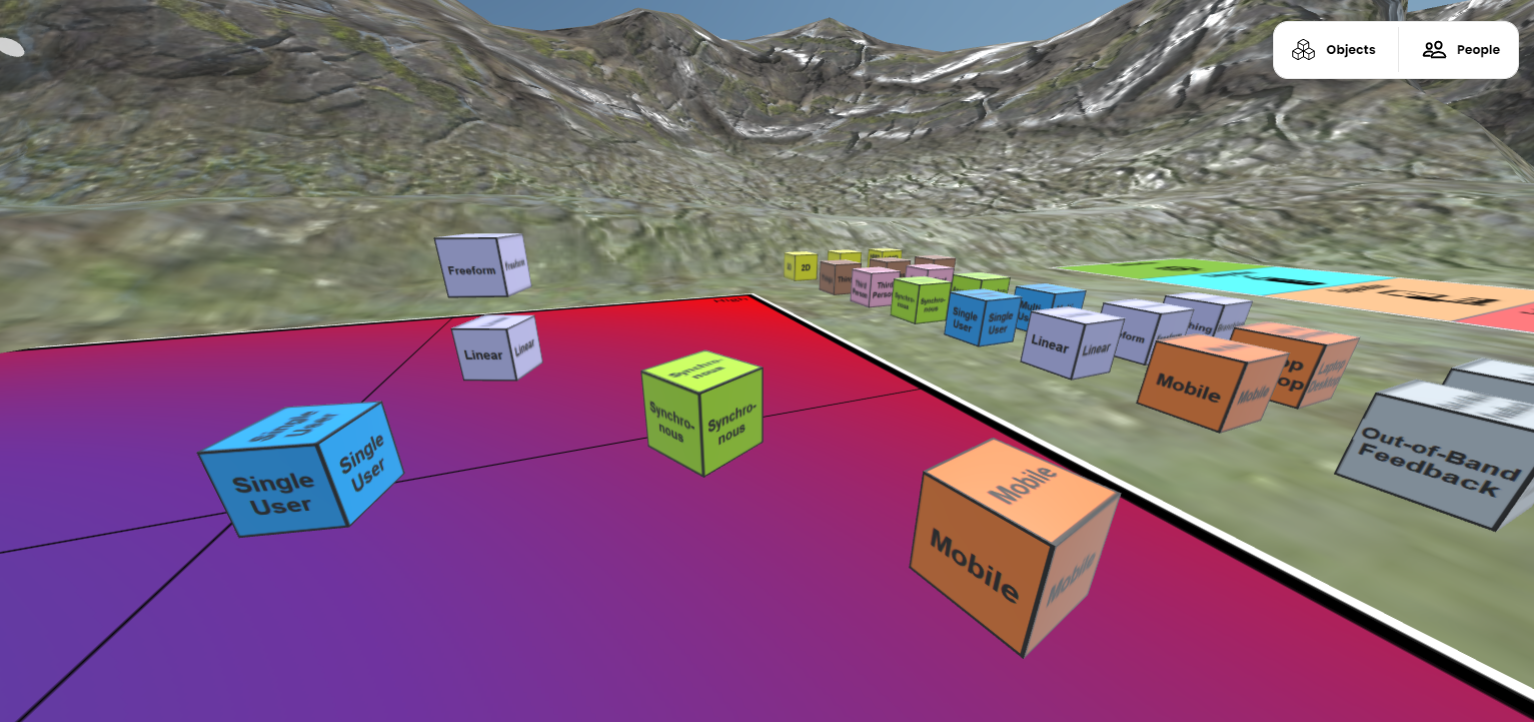
  • A dichotomies space, where you can  rank different features (such as linear/freeform or synchronous/asynchronous) against a variety of of different design factors (such as cost, importance, time, risk).
  • Sara de Freitas's 4D framework for vLearning design
  • Bob Stone's 3 Fidelities model
  • Bybee's 5E eLearning design model 
Each is represented by a suitable floor graphic and then how you use them is up to you. There are labelled boxes for the dichotomies space - but you can use them anywhere. There are also a set of markers, so you can get people to "vote" by placing markers (or even their avatar) where they think the most importance/biggest issue/biggest risk is. It's all about using VEDS as a social, collaborative space to do immersive 3D and VR design.

We've linked out in the world to our white paper on the subject for more background on the tools, and you can even browse this in-world (at least from a 2D device, can't get it to work in VR yet!).

Of course Hubs has its own set of generic collaboration tools to use in-world and you're free to make use of those too, we've provided a media frame and a couple of whiteboards to draw on, and you can rez any of their standard objects - why not mark choices with cheeseburgers!

Here's a couple more images of the space:


What to give it a try? Just point your 2D or VR browser to:


The hub.link code is 149638 for easier access from VR.

No sign up is necessary, but remember that if you use our room, rather than spawning your own, then you may well meet other users (including us) in there. We're setting the room to "Remix allowed" so you can also create your own version of it - do let us know if do!

If there's interest we might even see about holding some live events in there to talk about the tools in more detail.

We'd love to hear what you think of VEDS - just drop us a line in the comments, or email us at info@daden.co.uk if your organisation could do with a similar space structured around the tools you use.