As part of our work on a forthcoming white paper looking at the ever-growing range of 3D immersive environment platforms available we thought it would be useful to identify some criteria/function sets to help make comparison easier. If you were to use these as part of a selection exercise then you'd probably want to weight them appropriately as different use-cases would need different features. We've also assumed that all offer a common feature set, including multi-user and text/voice communications, walk/run, screengrabs etc.
A lot of these categories are quite encompassing, and a further analysis may split them down into sub-categories - or create more higher level categories where a particular feature becomes important. We may well revise this list as we work through the platforms (at least 25 at the current count) but here's our starter for 10 (in alphabetical order).
A/accessibility (with a lowercase a) and Usability
How easy is it for people to access and then use the environment? The gold standard is probably now WebXR environments that run in a browser. If the environment needs a download then is it a reasonable size (<500MB), does it install easily, and crucially will it give issues in a locked-down corporate or education environment? Once you've got the app installed is it easy to get to the content you want, do you have to wait for another long download? And then once in-world are all the controls obvious and the core UI (whether on screen or in an HMD) easy to use? Also how hard is it to navigate with your avatar (an area where many new users still struggle)? For HMDs in particular is immersion maintained throughout the experience? Upper-case A Accessibility is a whole other ball game and we'd love to do some work on access to VR for those with disabilities (we've done a demo of an audio virtual world).
Avatar Fidelity & Customisation
People get very focussed on what their avatar looks like. It's interesting that many of the current crop of SocialVR worlds have a) gone for quite cartoony, low rez avatars, and b) gone for a variation of the head-body-hands combination, with all things in between missed out (an inverse kinematics problem). Whilst the low-rez model might work for social gatherings and even business meetings/conferences does it also work for high-skills training? If you've got a lot of people in a multi-user environment then they are more likely to want a distinctive avatar (and often even if only single user!), so how easily and extensively can they customise their avatar? For added points how easily can your avatar emote, gesture, animate, show facial expressions and lip-sync to your voice?
Environment Fidelity and Flexibility
Just as people obsess about their avatar they can also obsess about every last pixel in the detail of the environment- too much Grand Theft Auto and not enough Pokemon Red in their childhood? Whilst a certain level of environmental fidelity is useful, too much can just place too high a demand on the device they are using, or have them spend all their time looking at the scenery and not at the task. What the right balance is will very much depend on the application, so can the platform support the range of fidelities you are likely to use? A nice touch with Mozilla Hubs is a dashboard of the impact of what you are building on its usability by a device - in terms of factors like polygon counts, lighting effects, texture sizes etc - at least it keeps it front of mind. Generally most worlds will support most fidelities, but some have hard limits on object and image upload sizes.
We also might need flexibility in the environment. We might be happy with some out-of-the-box templates for a meeting room, conference or classroom, or just the ability to upload 360 photosphere backdrops. Or we might want to build our own, or import from Blender, 3D Studio Max or elsewhere.
Meeting and Collaboration Functions
One of the biggest use cases for SocialVR is around social and business meetings and gatherings, from a bunch of friends getting together to a big international conference. There is a definite feature set which, whilst it could be customised afresh by each user/creator, is often made available out-the-box to get people started on collaboration and social tasks. This is likely to include items like image, file and screen sharing and virtual white boards, and may include shared web-screens, tilt-brush style in-world 3D drawing/graffiti and 3D object import/rezzing. It is taken as read that the world supports text chat and voice chat. Perhaps one of the most impressive features in this space is the 3D scene recording in EngageVR - nothing weirder than watching a replay of an avatar of yourself from within the same room!
Multi-Platform Support
The key issue for us is does the world support access in a 2D/3D (aka first-person-shooter/Minecraft/Sims) mode from an ordinary PC as well as from a VR Headmounted Display (HMD). Most people still don't have a VR headset, yet immersive 3D is of benefit to all. And even if they do have a VR headset there are a lot of use cases (in a cafe, on the train/bus, sat on the sofa half-watching TV) where they'd probably prefer the 2D/3D approach. There's also the case of which HMDs do they support - will they run on an untethered device like the Quest or do they need the power of a PC behind them like a Rift or Vive? And do they work on some of the "third-party" headsets like the Valve Index, HP Reverb or Pico? Of course if a world has cracked the accessibility challenge through using WebXR then multi-platform support may be more easily achieved (but still isn't a given).
If the world offers a 2D/3D mode then does it run on Windows and Macs (we assume), but what about Linux or Chromebooks? We also find that many students want to use iOS and Android devices, so does it also work on tablets and even smartphones - and here the issues of environment fidelity are likely to bite?
Object Rez, Build and Import
As with the environment we might want some ability to build our own objects in the world, or be happy with the provided libraries. Many worlds offer different permission levels, so "visitors" might not be able to rez things, or only rez a limited range, whereas "owners" can build anything. If I want something that isn't in the in-world library then how do I build it? Do I do this in-world through some sort of virtual Lego, or through what we used to call prim-torture in Second Life? Or do I buy in from a site like Sketchfab (where there may be IP, size or formats issues), or can I import meshes from a 3D design tool like Blender (in which case what formats are supported - glb/gltf seems to be the emerging format for WebXR worlds)?
Open Source/Standards Based/Portability
A lot of the early cyberspace was about walled gardens - AOL, Compuserve etc. The web, driven by standards like HTML and HTTP blew that all away. In particular people could a) build their own content, b) link their content to other people's content and c) host their own content on their own hardware (outside or inside a firewall) if they really wanted to. And apart from any hosting costs you didn't need to pay anybody anything. If we really want 3D environments to take off to the same degree as the web then we need something similar. The software that drives it needs to be open source, the different software and hardware components need to talk to common open standards, and assets (not only 3D objects but also more nebulous things like identities and avatars) need to be portable (or linkable) between spaces. The OpenSim HyperGrid is probably the closest we've had to this, and the move to WebXR might give us another way in to this model.
Persistency/Shared World/In-World Creativity (World Fidelity?)
Probably one of the biggest differences between something like Second Life and the current generation of SocialVR spaces is that the latter lack the persistency and single world model of Second Life. Most of the current platforms (Dual Universe may be an interesting exception) work on a spaces/room model, where you develop in a series of spaces, which you might then open up to visitors, and/or link to other spaces. This is a long way from the one-world model of Second Life (and also Somnium Space) where you just buy land and develop it (which is also closer to the original Snowcrash model). These spaces also tend to have a default state which they revert to once everyone has left - you might be able to rez things whilst you are in, but those objects disappear when you leave - this is particularly true (and probably desirable) in training and learning orientated spaces. If your Object Build model supports in-world building then persistency sort of becomes essential as that is how the world is built. I'm starting to like the idea of "World Fidelity" to describe all this - how much does the virtual world actually feel and behave like the real, peopled, physical world?
Privacy and Security
In a lot of applications you need to have some control of the privacy and security of your part of the virtual environment. You may only want your employees, students or clients in your space. Mind you there are also occasions when you want visitors to have rapid, anonymous access with no sign-up to put them off. Most platforms offer variations of access control, and perhaps it can be taken as read - but its worth double checking that the implementation will meet your specific needs.
There is also an emerging interest in using blockchain technologies to secure and manage the rights of ownership and IP in the objects created in the virtual world - such as in Somnium Space. This may be overkill for many applications, but is an interesting area to watch.
Scripting and Bots
Being able to walk around a space and look at things is nice. But being able to interact with objects (particularly if they can link through to Web APIs) is better, and being able to see and talk to bots within the space, which makes the whole place seem more alive, is better still. Scripting seems to be a big divide between platforms. Many (most?) of the SocialVR spaces don't support scripting - certainly as an ordinary user, or even as a "developer". The more training orientated ones do have scripting (but what language and how easy is it?), and some platforms have it only through a developer SDK (e.g. MREs in AltSpaceVR). Once every world supports the equivalent of JavascriptXR then we can really begin to see some innovative use of virtual space.
Cost
Cost is always likely to be a factor in any selection, but I was always taught that it should be on an orthogonal axis to the feature selection, and it may also be related to the Open Source/Portability assessment.
Radar Plot
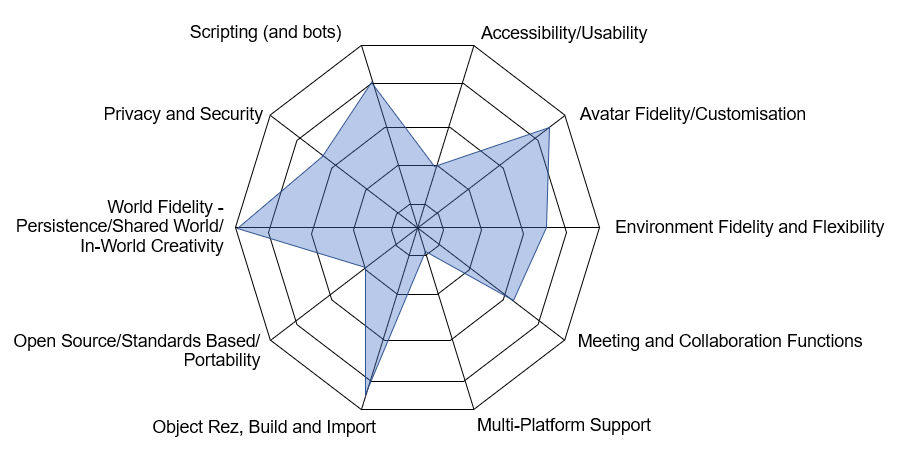
When we've got a set of parameters like this we find radar-plots as a nice way to represent target systems. The diagrams below show some prototype radar diagrams for Second Life and Mozilla Hubs.
 |
Radar Plot - Mozilla Hubs
|
 |
| Radar Plot - Second Life |
A Starter for 10
We are well aware that there are some things we've left off this list that others might see as vital - thinks like latency for instance. But it is out starter for 10. I'm sure your list varies, and would be interested to hear variations in the comments.