
I thought it might be useful to write a bit about the key design decision which informed the development of Trainingscapes - and which going forward may give us some novel ways of deploying the system.
 |
| An early PIVOTE exercise in Second Life |
Trainingscapes has its roots in PIVOTE. When we first started developing 3D immersive training in Second Life we rapidly realised that we didn't want to code a training system in Second Life (Linden Scripting Language is fun, but not that scalable). Looking around we found that many Med Schools used "virtual patients" - which could just be a pen-and-paper exercise, but more often a 2D eLearning exercise, and that there was an emerging XML based standard for exchanging these virtual patients called Medbiquitous Virtual Patients (MVP). We realised that we could use this as a basis of a new system - which we called PIVOTE.
A few years later PIVOTE was succeeded by OOPAL - which streamlined the engine, and also added a 2D web-based layout designer (which then put props in their correct places in SL), and then when we built Fieldscapes/Trainingscapes which refined the engine further.
The key point in PIVOTE is that the objects which the user sees in the world (which we call props) are, of themselves, dumb. They are just a set of 3D polygons. What is important is their semantic value - what they represent. In PIVOTE the prop is linked to its semantic value by a simple prop ID. The propID is what is the exercise file, not the prop itself.
Within the exercise file we define how each prop responds to the standard user interactions - touch, collide, detect (we've also added sit and hear in the past), any rules which control this, and what actions the prop should do in response to the interaction. So the PIVOTE engine just receives from the exercise environment message that a particular propID has experienced a particular interaction, and then sends back to the environment a set of actions for a variety of props (and the UI, and even the environment) to do in response. The PIVOTE engine looks after any state tracking.
 |
| The main Trainingscapes exercise/prop authoring panel |
This design completely separates the "look" of an exercise from its logic. This is absolutely key to Trainingscapes, and in day-to-day use has a number of benefits:
- We can develop exercises with placeholders, and switch them out for the "final" prop just by changing the 3D model that's linked to the prop ID.
- We can use the same prop in multiple exercises, and its behaviour can be different in every exercise.
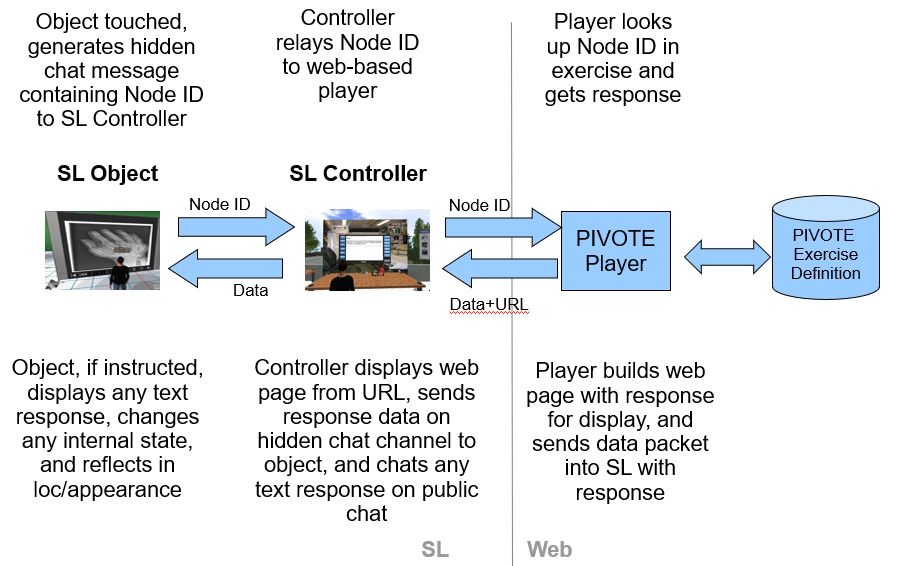 |
| Original SL version of the PIVOTE flow - but just change SL for any 3D (or audio) environment |
- The PIVOTE "player" can sit at the end of a simple web API, it doesn't have to be embedded in the player (as we currently do in Trainingscapes so that it can be off line)
- If a 3D environment can provide a library of objects and a simple scripting language with web API calls then we can use PIVOTE to drive exercises in it. This is what we did with Second Life and OpenSim - perhaps we can start to do this in AltSpaceVR, VirBela/Frame, Mozilla Hubs etc.
- By the same measure we could create our own WebGL/WebXR/OpenXR environment and let users on the web play Trainingscapes exercises without downloading the Trainingscapes player.
- There is no reason why props should be visual, digital 3D objects. They could be sound objects, making exercises potentially playable by users with a virtual impairment - we've already done a prototype of an audio Trainingscapes player.
- They could even be real-world objects - adding a tactile dimension!
Sounds like that should keep us busy for a good few DadenU days - and if you'd like to see how the PIVOTE engine could integrate into your platform just ask!

