1 December 2017

Fieldscapes Exercise Visualiser - Daden U Day


For the Daden U day I decided to create what I call the Fieldscapes Exercise Visualizer. The aim of the visualizer is to create a graphical representation of a Fieldscapes exercise. The idea came about while creating a complex Fieldscapes exercise, I was struggling to quickly recall the structure of the exercise, the Props, Prop Commands and their relationship with Systems Nodes. Another reason for creating the visualizer was to have a way of explaining the flow of the exercise from begin to end. If it a non-linear exercise they different paths can also be illustrated.


Before beginning work on the visualizer I had a few ideas of how to illustrate the exercise using symbols and shapes. Fortunately I discovered a web application called draw.io whilst trying to created a flow diagram manually using pre existing tools. Initially I had attempted use Umlet which is windows application for drawing UML diagrams but decided against it. Reason being that a web application would be more accessible. As a web application I could integrate it into the Fieldscapes Content Manager reducing the number of tools content creators have to access to make full use of the Fieldscapes ecosystem.


Unfortunately draw.io does not have an API (Application Programming Interface). In my attempt to find a the API I discovered that it uses library called mxGraph. mxGraph is a JavaScript diagramming library that enables interactive graph and charting applications to be quickly created that run natively in most major browsers. mxGraph has a backend which supports the javascript application running on a server. This backend software can either use Java, C-Sharp(C#) or PHP. For the purpose of the U Day I used the C# backend as Fieldcapes is written in C#.


After downloading the source code for mxGraph from the Github repository. The source code contained an example C# .Net website. The solution worked right out of the box without an issues. Fortunately because of work done for the Fieldscapes Editor most of the code needed to read Fieldscapes exercises stored in XML was already written so all I needed to do was write a couple of functions that extracted the data I needed to represent the various elements of an exercise as geometry with connecting lines. Extracting the data was a breeze however progress grinded to a halt when I tried to draw different shapes to represent the various elements of an exercise such as props, system nodes etc. After some trial and error and lots of googling I managed to understand how to style the vertex which is the word used in mxGraph for the geometry that are draw on the canvas.


From what I saw of the documentation and my brief time using mxGraph, mxGraph is a powerful library that has many affordances for those who want to create diagrams of any nature. It allowed me to create a diagram(see image below) that showed all the different elements of a Fieldscapes exercise with line indicating their relationships with to each other. The next step create some form of structure for the diagram. Development on the Fieldscapes Exerciser Visualizer is not a priority at the moment but it something I intend to continue working on until it becomes more useful at which point it will be integrated into the Fieldscapes Content Manager.


2 November 2017

C# as a Scripting Language - and in Fieldscapes?

By: Iain Brazendale

Daden U days give me the opportunity to play with ideas that have been floating around at the back of my mind for some time and this Daden U day was no exception.

I’ve been reading good things about the changes Microsoft have been doing to their .NET complier platform “Roslyn” particularly with regards to adding scripting support. It was this combined with thoughts of how we could easily add additional functionality to Fieldscapes that made me decide it was time to take a deeper look at scripting.

The advantage of scripting provided through .NET compiler is that there’s no need to learn yet another scripting language, scripts are simply written in C# but with looser syntax requirements.


Following the article quickly gave me a rough working console application to do some testing with:


This example shows accessing an array containing the names of images for different days of the week. The third query to me shows the real power of the script – here the day of the week becomes the index into the images and returns the correct images for the day of the week (You guessed it – I ran this example on a Tuesday). The ability to show a different image for each day of the week is not something that is ever likely to be baked into Fieldscapes, however, adding scripting support allows this new functionality to be added with a single line of script.

This example below shows how picking of images at random can be achieved.


However, with great power comes great responsibility… if we let users add their own scripts then they could take advantage:


Here we can see that users may access functionality that wasn’t intended, in this case displaying inappropriate messages. Also of note, as you can see from my several attempts to get the syntax right (C# is case sensitive), it could be fiddly for people to write scripts without the use of a good IDE correcting those minor typos. These issues suggest that scripting is something that should initially be left to the “advanced” users and more thought and design will be needed before it becomes a “typical” user feature.

So, when will scripting be added Fieldscapes? Unfortunately, scripting requires .NET 4.6 and Roslyn. Unity still uses .NET 3.5 with a non-Roslyn compiler so as wonderful as this technology looks it won’t be a scripting solution for Fieldscapes until the tech catches up. However, it could be a useful technology for Daden’s other products such as Datascape.


26 October 2017

Daden October Newsletter - Fieldscapes in Bournemouth, new iOS release, smart city data


In this latest issue of the Daden Newsletter we cover:

* Fieldscapes in action! - a report on the project we are doing with Bournemouth University to evaluate training midwifery students in 3D and VR.
* The new iOS release of Fieldscapes, and updates to the Android and VR user interfaces to increase usability
* Visualising Smart City data with Datascape
* The return of Abi - our virtual assistant chatbot

Remember you can try our products instantly and free of charge by going to:

* https://www.fieldscapesvr.com/download for Fieldscapes and Trainingscapes
* https://www.datascapevr.com/trial for Datascape

We hope you enjoy the newsletter, and do get in touch (http://www.daden.co.uk/#contact) if you would like to discuss any of the topics raised in the newsletter, or our products and services, in more detail!


** Download your PDF copy of the newsletter here .

23 October 2017

Trees in Birmingham


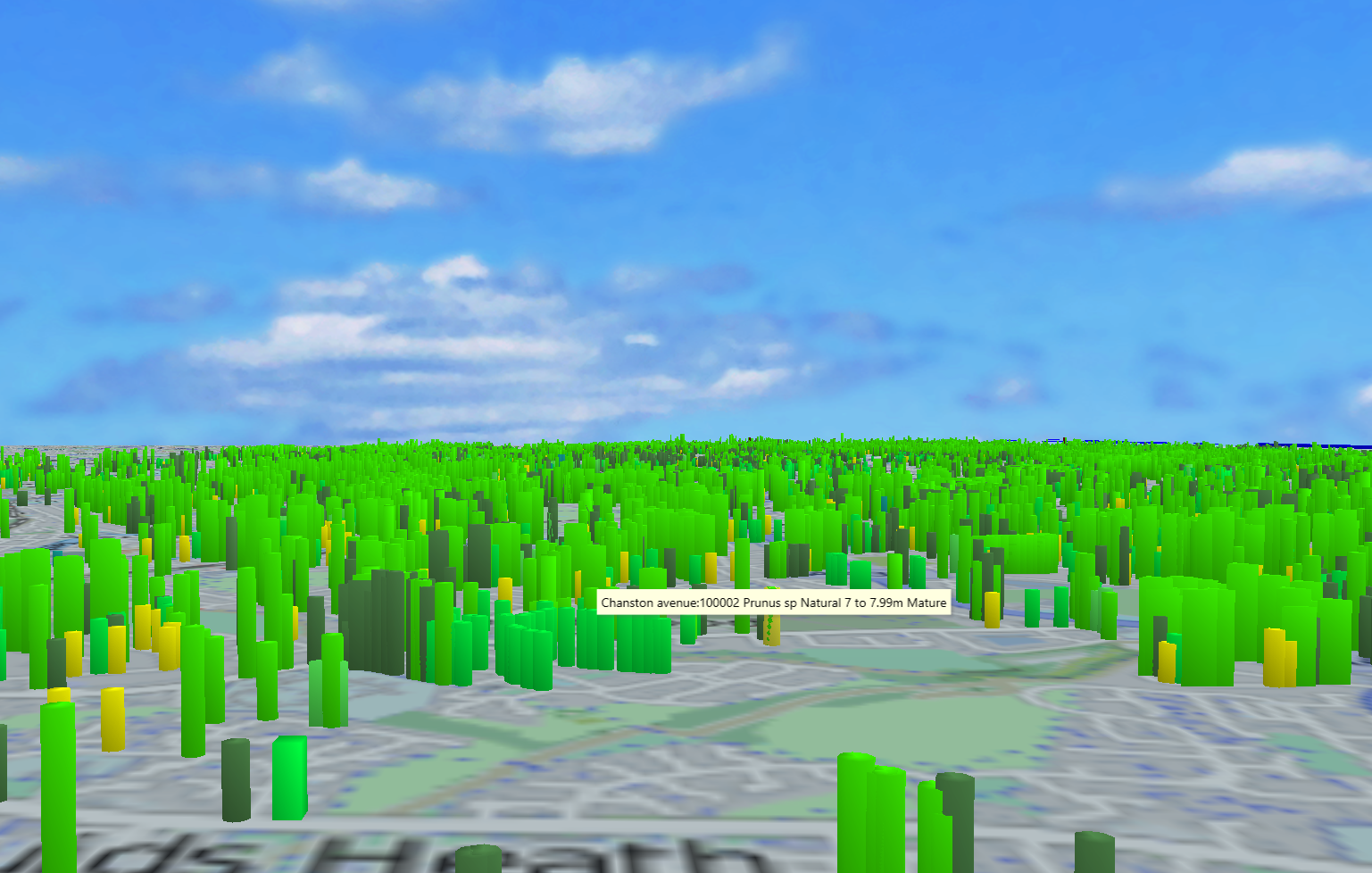
The West Midlands Data Discovery Centre is publishing a wide and interesting set of open data on the West Midlands. Over the next few weeks we'll take a look at some of the data sets and use them to create visualisations in Datascape.

First up is a database of all the tress managed by the city's highways department. For each tree we have:


  • Locations (lat/long)
  • Height (shown as height on map)
  • Age (shown as colour, yellow = new, green = mature, brown = old)
  • Form (eg symmetric/non-symmetric - latter more at risk from storms, shown as shape)
  • Species (shown in text)


This gives a low oblique view over the city, showing relative heights - as expected the younger trees tend to be smaller!


Close in on a set of pollarded and unbalanced trees. Bright green are mature, dull green are semi-mature. The small blue one has unspecified data.

We can use the standard Datascape search, filter and scrub features to help analyse the data.

We've published a subset of this visualisation to the web so that you can fly around and investigate it yourself. Just click on the image or link below.


More datasets from WMDDS to follow!

9 October 2017

Fieldscapes 1.4 released


Fieldscapes v1.4 is now out and available for free download and had some good heavy user testing at Malvern recently with Year 7s from across the county. The main new features in v1.3 and v1.4 are:


  • The start of support for NPC characters through an NPC widget. You can now add an NPC avatar as a prop and have it TP from location to location and activate specific animations - eg "sit". Later releases will allow the NPC to glide or walk between locations. We are also close to releasing a "chatbot" widget to hook an NPC up to an external chatbot system so that you can really start to create virtual characters.
  • General improvements to the UI when in VR mode - users found that the "virtual iPAD" just got in the way so we're now putting the UI directly into the scene. We'll make steady improvements to the usability of the VR experience in future releases
  • Added a new Avatar command to change clothes. This only changes between preset outfits but is good if a character needs to change into special kit for a task - for instance our nursing avatars putting on gloves and aprons (see below)
  • Multiple choice questions are now randomised - makes the student think if they repeat the lesson!
  • Increased the inventory limit from 3 to 5 in the editor - so you can bring in props from more inventories for your scene
  • Increased the word count for multiple-choice panels and default popup panel

Various bug fixes were also made and you can see a full list at http://live.fieldscapesvr.com/Home/Download


v1.4 is already available for PC and Mac. The Android version of v1.4 is just under final testing, and we're also still progressing the iOS version of Fieldscapes through the App Store acceptance process.

Remember: We have an ongoing survey for new Fieldscapes features, please take 2-3 minutes to fill it out at: https://www.surveymonkey.co.uk/r/88YL39B

4 October 2017

Fieldscapes at the Malvern Festival of Innovation

Oculus Rift on the Moon

For the second year in a row we ran a set of workshops at the Malvern Festival of Innovation playing host to a succession of groups of 20-30 students (mostly year 7s) from around Worcestershire and giving them a 1 hour introduction to immersive learning. We set up four stands in order to show the range of experiences and lessons that can be created, and the different ways in which they can be delivered. We had:


  • One laptop running the Solar System lesson
  • One laptop running the Apollo Educate lesson
  • One laptop running the Introduction to Carding Mill (which several groups knew from Fieldtrips)
  • A couple of Google Cardboards, one with the Photosphere tour of Carding Mill and one the Apollo Explore lesson
  • Oculus Rift running Apollo Explore
Playing tag on the Moon!


Students were split into groups of about 5 and had 10 minutes on each "stand" - so everyone got to try all the kit.

Looking at the Waterspout Waterfall in a (plastic) Google Cardboard


Student feedback from comments and feedback forms included:
  • "I wish I could spend all afternoon here"
  • "Can I come back later?"
  • "It was really cool"
  • "It was fun to do"
  • "It was memorable"
  • "The realness of it"
  • "I liked the fact that we were not there but we could see everything"
  • "It was like it was real"
  • "It was educating and fun"
Exploring the Moon and Apollo on Google Cardboard


When talking to the teacher we were keen to highlight that:
  • They didn't have to buy any new hardware, like expensive VR headsets, as they can run lessons in 2D/3D mode on existing computers, or in VR on Google Cardboard (one teacher loaded the app onto his phone as we spoke)
  • They could create their own lessons, share them, and use (and customise) those producted by other users
  • With our licencing model they only started paying once they started using it in class, so they could explore and test for free until they were confident in the system and lessons and were ready to use it in class.
Even the teachers got in on the act!


Fieldscapes itself was rock solid on all the devices all day - despite getting a hammering from the kids. What was particularly impressive was when we had the Apollo experiences in multi-user mode so the kids could play tag on the moon - and even using the public wifi at the venue we had no issues with lag and avatar movement was very smooth.


All in all a great day and helped remind us all why we've built Fieldscapes!


2 October 2017

Abi's Back!


Having been off on sabbatical for a few years whilst we rebuilt the web sites Abi, our virtual assistant is back up. We think she forgot a fair amount whilst she was backpacking around the world, but we'll slowly bring her up to speed, and she's got lots to learn about what with Datascape, Fieldscapes and Trainingscapes. One thing we have given her is the ability to load up web pages - we used to do this on client clients but never got around to doing it on our own!

So if you've got a question about Daden or any of our products just talk to Abi.

This new Abi is built on the Chatscript open source platform that we're using for all our chatbot projects now. She's not the smartest bot we've done, but does give you an idea of the basic sort of functionality and interaction style. When she loads she also provides a page which gives you some idea of her scope and some of the "tricks" we're teaching her.

You can read more about our chatbot work on our dedicated website at www.chatbots.co.uk.

Just get in touch if you'd like to know more about chatbot technology and have a project in mind.

For a quick trip down memory lane here are some of Abi's previous incarnations.

The very first ABI - text and static image in Second Life


Abi as an avatar walking around our old Sim in Second Life


Abi moved onto our website with an art-work avatar


Abi before she went on hols as a photoface avatar